
Write to the team (Help & Feedback)
Report a bug, suggest an improvement or ask the Carnet Condo team a question from the app, or open the help center.
- Audience
- Everyone
- Screen
- User menu › Help & Feedback
- Verified version
- App 1.0.0
Goal
Reach the team that builds Carnet Condo without leaving the app: a bug to report, an idea, a question.
Audience
All members, administrators or not.
Prerequisites
- Be signed in.
Steps
-
Click your name at the top right (on a phone, the ☰ icon), then "Help & Feedback".
-
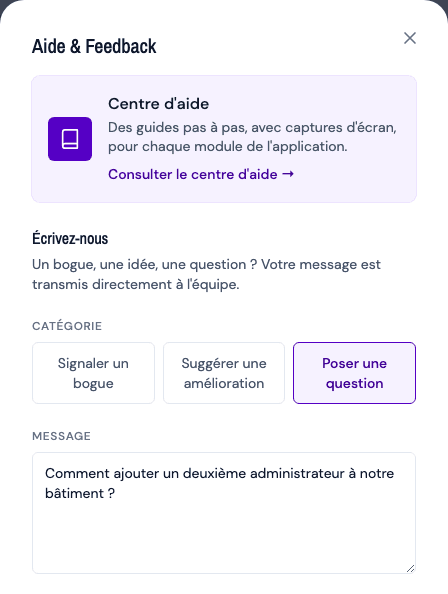
The "Help & Feedback" window opens. At the top, the "Help center" card ("Step-by-step guides, with screenshots, for every module of the app."): "Browse the help center →" opens this help center in a new tab, in French or English depending on the app's language. Start there: the answer is often already in it.
-
Under "Write to us" ("A bug, an idea, a question? Your message goes straight to the team."), choose the Category:
- Report a bug (default);
- Suggest an improvement;
- Ask a question.
-
Write your Message. The grey example in the box changes with the category; for a bug: "Describe what happened, with steps to reproduce if possible…".
-
Click "Send" ("Sending…" while it is sent). The confirmation shows: "Thank you! Your message has been sent. We will reply within 2 business days."
What is attached to your message
To help the team understand, the message is sent with the address of the page you were on, your browser and the active building. You do not need to mention them.
Tips and common errors
- Send stays grey: the message is empty; write at least one word.
- Sending failed: "Sending failed. Email us directly at …"; the message gives the team's email address. Your text stays in the window: copy it into your email.
- Prefer email? The team's address is shown at the bottom of the window; a click opens your email app. We reply in French or English within 2 business days.
- Cancel closes the window without sending anything.
- Question about your building (an intervention, an access): it is for your administrators instead, see Contact the board of directors.