
Building & team
Promote or demote an administrator
Grant or remove administrator rights for a team member from their card.
- Audience
- Administrator
- Screen
- Building settings, Members sub-tab → member card
- Verified version
- App 1.0.0
Goal
Grant or remove administrator rights for a building member.
Audience
Administrator of the building.
Prerequisites
- Be an administrator.
- The action applies to another member: you can't change your own rights.
Steps
- Open Building settings in the sidebar (at the very bottom, gear icon), then the Members sub-tab.
- In the member grid, find the card of another member. An administrator carries the "Administrator" badge.
- In the card's row of actions, click:
- Make admin: grants administrator rights;
- Remove admin: removes those rights (shown if the person is already an administrator).
- The change is immediate and a message confirms it ("… is now an administrator" or "… is no longer an administrator").
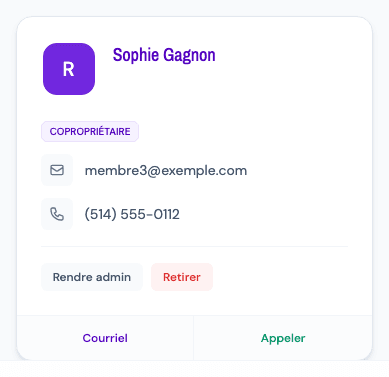
Nothing to do on your own card
Your card is marked "You" and doesn't show these actions.
Tips and common errors
- Missing buttons: they only appear on other members' cards, and only for an administrator.
- Read-only access: if the subscription is overdue or canceled, the management actions are disabled (tooltip "Read-only access"). Settle the subscription in the Subscription sub-tab.
- Failure: an error message appears; try again.