
Components & suppliers
Filter, search and export the component register
Find a component by name or Uniformat code, isolate those with alerts, and export the register to Excel or PDF.
- Audience
- Administrator
- Screen
- Component register
- Verified version
- App 1.0.0
Goal
Quickly find a component, isolate the ones that need attention, and export the register.
Audience
Administrator of the building.
Prerequisites
- The register contains components.
Steps
-
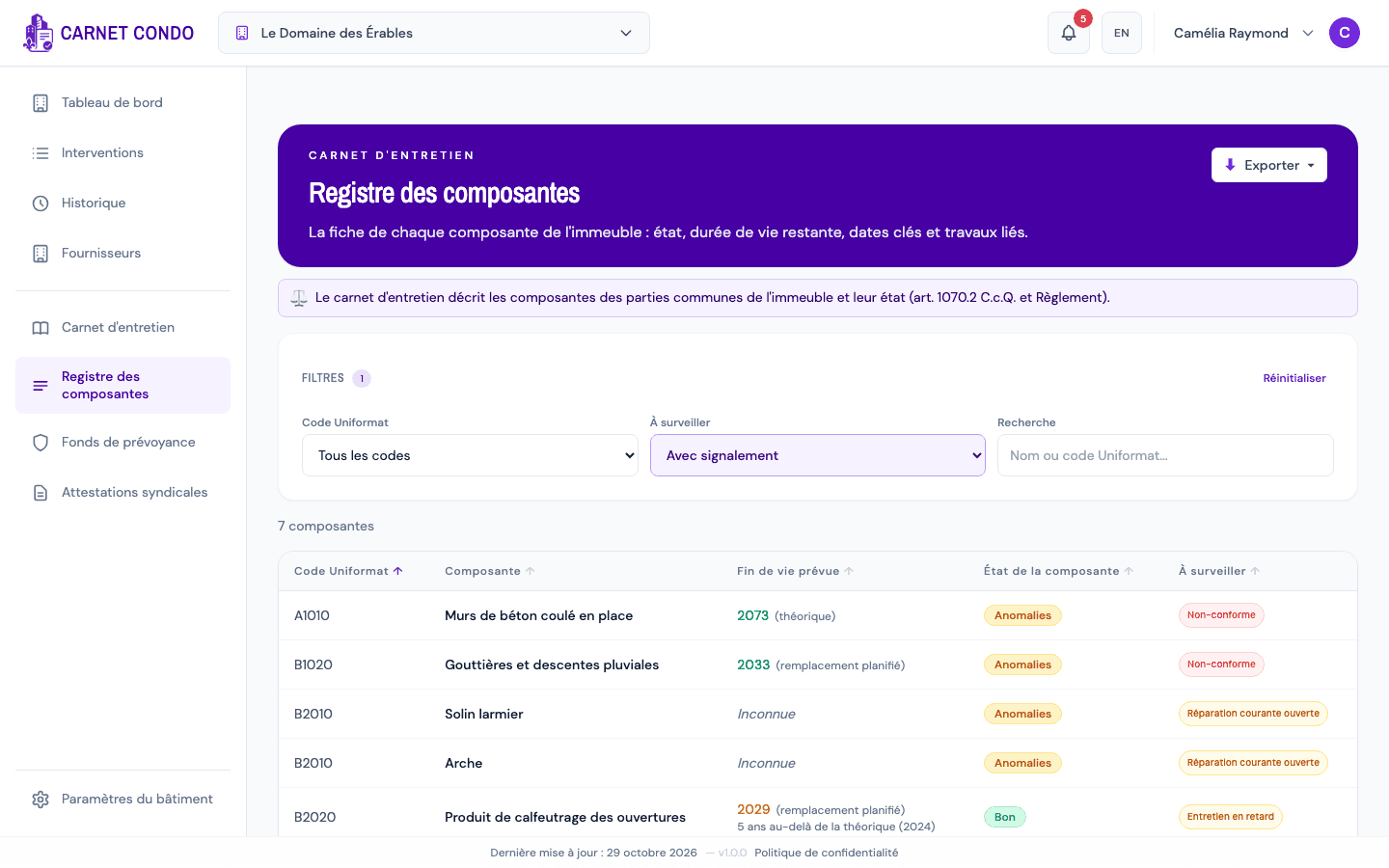
At the top of the register, the "Filters" panel offers:
- Uniformat code: all codes or a specific code;
- To watch: All components, With alerts or Without alerts;
- Search: name or Uniformat code (e.g. "roof", "B3010").
-
The "N components" counter updates. A badge on "Filters" shows how many filters are active; "Reset" clears them all.
-
To sort, click a column header (an arrow shows the direction).
-
To export, click "Export" at the top right, then Excel (.xlsx) or PDF (.pdf). The export follows the list as filtered.
Isolate what needs attention
The To watch = With alerts filter shows at once the components that have a non-compliance, overdue work or an open repair.
Tips and common mistakes
- Combined filters: filters add up (code + to watch + search).
- No results: "No components match the selected filters." Use "Reset" to start over.